
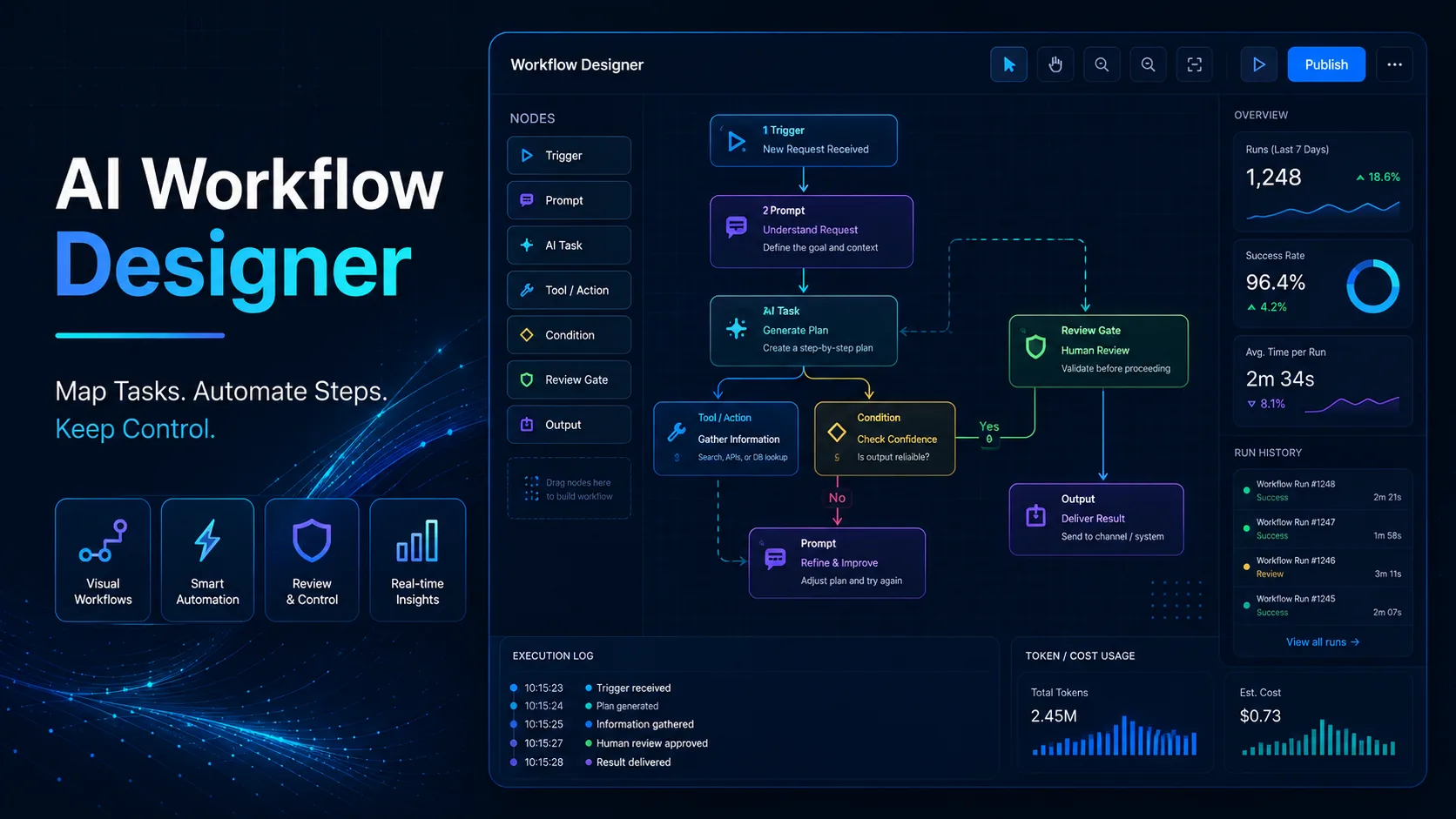
Artificial intelligence becomes far more useful when individual tasks are connected into a clear, repeatable process. An AI Workflow Designer helps organize triggers, inputs, AI tasks, review steps, actions, and measurement so automation supports real work instead of creating another layer of complexity.
A practical AI Workflow Designer should make the process easier to understand, test, monitor, and improve. The objective is not to automate everything. It is to decide which steps AI can handle reliably, where human judgment remains necessary, what happens when something fails, and how performance will be measured over time.
What Is an AI Workflow Designer?
An AI Workflow Designer is a structured method for planning how information, decisions, and actions move through an AI-assisted process.
A basic workflow can be represented as:
Trigger → Context → AI Task → Quality Check → Human Review → Action → Measurement
Each stage has a specific purpose.
Trigger starts the workflow.
Context provides the information required to complete the task.
AI Task performs a defined job such as classification, extraction, summarization, generation, or evaluation.
Quality Check tests whether the output meets predefined requirements.
Human Review is used when judgment, approval, or risk management is required.
Action stores, sends, publishes, updates, or otherwise uses the result.
Measurement records what happened so the workflow can be improved.
A reliable AI Workflow Designer keeps these stages separate enough that errors can be identified instead of hiding the entire process inside one large prompt.
Map the Existing Process Before Automating It
The first step is not choosing an AI model or automation platform.
Start by understanding how the work is completed today.
Imagine a content workflow:
Research → Outline → Draft → Fact Check → SEO Review → Human Review → Publish
Before automating any part of it, document:
- who performs each step;
- what information enters the step;
- what output is expected;
- how long it normally takes;
- which tools are involved;
- where delays occur;
- which mistakes happen repeatedly.
The AI Workflow Designer should simplify unnecessary steps before adding automation.
Automating a confusing process usually produces a confusing automated process.
For research-heavy workflows, the AI Research Assistant can help organize evidence and source verification before information enters later workflow stages.
Classify Each Task Before Choosing the AI Step
Different tasks require different instructions.
A strong AI Workflow Designer should identify what kind of work each step actually performs.
Common AI task types include:
| Task Type | Purpose | Example |
|---|---|---|
| Classification | Assign a category | Support request type |
| Extraction | Pull specific data | Name, date, price |
| Summarization | Reduce information | Research summary |
| Generation | Create new output | Draft email |
| Evaluation | Check against criteria | Quality review |
| Transformation | Change format | Notes to structured table |
Separating these tasks makes the workflow easier to test.
For example, instead of asking one prompt to read a customer message, classify it, decide its urgency, write a reply, and determine whether it should be escalated, divide the process into smaller steps.
That allows the AI Workflow Designer to identify which stage failed when the final result is wrong.
Define Clear Inputs and Outputs
Every automation step should know what it receives and what it must return.
A weak instruction might be:
Process the customer request.
That is too vague.
A stronger specification would be:
Input: Customer message, account type, purchase history, support policy.
AI Task: Classify the request, identify urgency, and draft a response.
Output: Category, priority, draft reply, escalation status.
Structured outputs reduce ambiguity between workflow stages.
They also make it easier to validate results automatically.
For example, an output could require:
Category:
Priority:
Summary:
Draft Response:
Escalation Required:
Missing Information:
Now the next stage knows exactly what fields should exist.
A practical AI Workflow Designer should avoid handoffs where one step produces unstructured information that another step has to interpret from scratch.
Build Context Before Improving the Prompt
Prompt wording matters, but missing context often causes bigger problems.
An AI step may need:
- customer information;
- previous messages;
- product details;
- internal policies;
- research notes;
- templates;
- brand guidelines;
- examples;
- current task instructions.
The goal is not to send every available document into every prompt.
The goal is to provide only the context needed for that specific decision.
Too little context can create incomplete results.
Too much irrelevant context can make the workflow slower, more expensive, and less focused.
The AI Workflow Designer should therefore define context requirements for each individual step.
For broader productivity systems, the AI Productivity Toolkit provides additional frameworks for combining research, content creation, and AI-assisted work.
Decide Which Steps Should Stay Human
Automation should not remove human control simply because a task can technically be automated.
An AI Workflow Designer should consider the cost of a wrong action.
AI may be suitable for:
- sorting requests;
- extracting fields;
- preparing first drafts;
- summarizing documents;
- generating alternatives;
- formatting information;
- creating routine reports.
Human review may remain important for:
- high-value decisions;
- sensitive communication;
- legal or financial approval;
- confidential information;
- strategic decisions;
- unclear or contradictory cases.
A useful rule is:
Low risk + predictable task → automate more
High risk + expensive mistake → require more review
This makes automation proportional to the consequences of failure.

Add Quality Gates Before the Workflow Continues
An AI Workflow Designer should define what a successful output looks like before automation goes live.
Useful quality checks can include:
- required fields are present;
- facts match available sources;
- output follows the requested format;
- tone matches brand guidelines;
- restricted information is absent;
- confidence is above a defined threshold;
- required links or references are included;
- human approval has been received where necessary.
A content workflow might reject a draft if the main topic is missing from the title or if mandatory sections are absent.
A research workflow might stop if an important claim cannot be connected to a verified source.
This makes the AI Workflow Designer more reliable because errors are caught before they move into later stages.
Create Error Paths, Not Just Success Paths
Many workflow diagrams only show what happens when everything works.
Real systems need recovery paths.
Common failures include:
- missing information;
- invalid input;
- empty AI output;
- duplicated requests;
- formatting errors;
- low-confidence results;
- human rejection;
- external service failure;
- timeouts.
A practical AI Workflow Designer should define what happens next.
For example:
Missing customer data → request required fields
Low-confidence classification → send to human review
Rejected draft → return to AI step with reviewer feedback
External service unavailable → retry later
Repeated failure → escalate to a human operator
Good automation is not only about successful runs.
It is also about safe failure handling.
Build a Content Production Workflow
Content creation is a useful example because it includes several different AI tasks.
A structured flow could be:
Topic → Research → Evidence Check → Outline → Draft → SEO Review → Human Review → Publish → Measure
Each step has a different objective.
Research collects information.
Evidence checking verifies important claims.
The outline organizes the page.
Drafting creates the first version.
SEO review checks structure and search requirements.
Human review checks accuracy, usefulness, tone, and context.
Publishing happens only after the required gates are passed.
A strong AI Workflow Designer keeps these responsibilities separated instead of asking one prompt to research, write, optimize, verify, and publish everything at once.
For conversion-focused content, the Landing Page Copywriter can become a dedicated stage when the workflow produces landing pages rather than traditional articles.
Build a Marketing Workflow
An AI Workflow Designer can also coordinate recurring campaign work.
A practical marketing flow might look like:
Campaign Goal → Audience Research → Message → Variations → Approval → Distribution → Tracking → Optimization
AI can help produce multiple headline or copy variations.
Human review can approve the final message.
Performance data can then return to the workflow.
For example, if one subject line consistently improves opens or one CTA improves conversions, that result can influence future drafts.
The Social Media Calendar can support the planning stage by organizing campaign topics, channels, schedules, and publishing cadence.
Build a Business Research Workflow
A business research process may use:
Question → Research Plan → Source Collection → Evidence Extraction → Comparison → Analysis → Review → Report
The AI Workflow Designer should keep source evidence separate from assumptions.
That is especially important when the workflow feeds into planning decisions.
For larger projects, the AI Business Plan Generator can use the verified research gathered earlier instead of starting from a short unsupported prompt.
Keep the Workflow Observable
An AI Workflow Designer should make important workflow activity visible.
Useful records can include:
| Field | What to Record |
|---|---|
| Start Time | When the run began |
| Input | What entered the workflow |
| AI Step | Which task was performed |
| Output | What was produced |
| Review | Approved, rejected, or revised |
| Error | What failed |
| Retry | Whether another attempt occurred |
| Final Action | What happened next |
| Completion Time | Total processing time |
Observability matters because automation can fail silently if there is no record of what happened.
If performance drops, logs can help identify whether the problem came from missing context, a weak prompt, a failed integration, or a review bottleneck.
Measure Workflow Performance
Automation should improve something measurable.
A useful AI Workflow Designer can monitor:
- processing time;
- success rate;
- error rate;
- human review rate;
- cost per execution;
- quality score;
- retry rate;
- time saved.
Suppose a manual process takes 25 minutes and the automated workflow reduces average handling time to 10 minutes while maintaining quality.
That is useful.
If the workflow reduces handling time but doubles the number of errors and escalations, the result may be worse overall.
The AI Workflow Designer should therefore measure speed and reliability together.
Optimize the Real Bottleneck
When a workflow is slow, adding more AI is not automatically the answer.
The bottleneck may be:
- human approval delays;
- slow data retrieval;
- repeated retries;
- poor context;
- unnecessary workflow steps;
- unreliable integrations;
- manual handoffs.
Measure where the delay actually happens.
Then improve that part first.
A practical AI Workflow Designer should simplify before adding new automation.
Protect Sensitive Information
Automation may move information between multiple tools, so data handling should be considered during design.
Important practices include:
- send only necessary information;
- restrict access permissions;
- protect credentials;
- avoid placing API keys or passwords inside prompts;
- identify sensitive data;
- maintain appropriate logs.
The AI Workflow Designer should always ask:
What information does this step actually need?
Reducing unnecessary data movement can improve both security and workflow clarity.
Start Small Before Scaling
A first workflow should be easy to test.
Good starting candidates are processes that:
- happen frequently;
- have clear inputs;
- have predictable outputs;
- consume measurable time;
- have manageable risk;
- can be reviewed easily.
Build a small prototype.
Run it alongside the existing process.
Compare quality, speed, errors, and intervention rates.
Then expand only after the core workflow is stable.
A reliable AI Workflow Designer scales proven patterns instead of automating an entire operation at once.

Use the AI Workflow Designer Master Prompt
Role:
Act as an AI Workflow Designer and automation planning assistant.

Workflow Goal:
[DESCRIBE THE PROCESS YOU WANT TO IMPROVE]

Trigger:
[WHAT STARTS THE WORKFLOW?]

Inputs:
[LIST THE DATA, FILES, MESSAGES, OR CONTEXT REQUIRED]

Current Steps:
[DESCRIBE THE EXISTING MANUAL PROCESS]

AI Tasks:
[CLASSIFICATION / EXTRACTION / SUMMARIZATION / GENERATION / EVALUATION / TRANSFORMATION]

Human Review:
[DEFINE WHICH STEPS REQUIRE APPROVAL]

Quality Requirements:
[LIST REQUIRED FIELDS, FORMAT, SOURCES, TONE, LIMITS, OR CHECKS]

Failure Conditions:
[DEFINE MISSING DATA, LOW CONFIDENCE, API ERRORS, REJECTIONS, OR OTHER FAILURES]

Final Action:
[STORE / SEND / PUBLISH / UPDATE / NOTIFY / ESCALATE]

Metrics:
[TIME SAVED / ERROR RATE / QUALITY / COST / REVIEW RATE / SUCCESS RATE]

Rules:
- Do not invent missing business information.
- Keep verified inputs separate from assumptions.
- Define one clear input and output for every step.
- Add quality gates before important actions.
- Require human review for high-risk or ambiguous decisions.
- Create explicit recovery paths for failures.
- Minimize unnecessary sensitive data.
- Prefer simple workflows over unnecessary complexity.

Create:
1. Workflow map
2. Step-by-step input/output table
3. AI task classification
4. Context requirements for each AI step
5. Quality gates
6. Human review rules
7. Error and retry paths
8. Logging requirements
9. KPI dashboard
10. Implementation checklist
This AI Workflow Designer prompt is designed to produce a workflow that can be inspected, tested, and improved instead of one large black-box automation.
Create a 30-Day Implementation Plan
A practical first month should focus on one workflow with measurable value.
Week 1 — Discover
Map the current process, record baseline time, identify repetitive work, document common failures, and define the outcome that should improve.
Week 2 — Prototype
Build the smallest useful version of the workflow.
Define:
- the trigger;
- required context;
- AI steps;
- structured outputs;
- quality gates;
- review conditions;
- final action.
Week 3 — Test
Run:
- normal cases;
- incomplete inputs;
- incorrect inputs;
- edge cases;
- human rejections;
- failed external actions.
A strong AI Workflow Designer should test failure handling before the workflow is trusted with larger volumes.
Week 4 — Deploy and Measure
Launch to a limited group or controlled workload.
Track:
- processing time;
- error rate;
- intervention rate;
- success rate;
- quality;
- cost;
- time saved.
Scale only after the workflow behaves consistently.
Run a Final Workflow Review
Before deploying a workflow more widely, check:
- Is the trigger clearly defined?
- Does every step have a clear input and output?
- Is each AI task narrow enough to test?
- Is relevant context available?
- Are quality gates defined?
- Are risky actions reviewed by a human?
- Are failures routed somewhere useful?
- Are retries limited?
- Are important events logged?
- Is sensitive information minimized?
- Are success metrics measurable?
- Is the workflow simpler than the process it replaced?
An AI Workflow Designer should make the system easier to understand, not merely more automated.
Improve the Workflow Through Evidence
A workflow should not remain unchanged after launch.
Review performance periodically.
Useful questions include:
- Which step produces the most errors?
- Which stage creates the longest delay?
- Which outputs require the most human correction?
- Which AI task adds the most value?
- Which step could be removed?
- Which rule needs tighter validation?
- Which cases should always be escalated?
A practical AI Workflow Designer uses these answers to simplify and improve the system.
For example, if most failures happen because customer information is missing, improving the input form may create more value than changing the model.
If reviewers repeatedly correct the same issue, that correction can become a new quality gate.
Avoid Common AI Workflow Design Mistakes
Several mistakes can make automation harder to maintain.
Avoid:
- automating an undefined process;
- using one enormous prompt for every task;
- passing unnecessary context to every step;
- allowing AI to perform high-risk actions without review;
- building only a success path;
- retrying failures indefinitely;
- ignoring logs;
- measuring speed without measuring quality;
- moving sensitive information unnecessarily;
- scaling before testing edge cases.
A reliable AI Workflow Designer should reduce operational confusion instead of hiding it behind automation.
Use External Guidance Without Adding Tracking
Teams building more advanced AI systems can also review official external guidance.
OpenAI’s Practical Guide to Building Agents discusses agent structure, tools, guardrails, and workflow complexity.
The NIST AI Risk Management Framework provides a structured approach to identifying and managing AI-related risk.
The n8n AI Workflow Testing Guide explains how evaluations and quality measurements can help identify failures and improve automated workflows.
Access the Complete AI Workflow Designer Guide
The downloadable AI Workflow Designer PDF is an optional companion to the full workflow explained in this article.
The page already provides the core framework directly, including:
- process mapping;
- task classification;
- input/output design;
- context planning;
- quality gates;
- human review;
- error handling;
- logging;
- performance measurement;
- security considerations;
- scaling principles;
- Master Prompt;
- 30-day implementation plan;
- final review checklist.
The PDF adds reusable worksheets, expanded workflow templates, testing sheets, error-path planning tools, implementation exercises, and repeatable review resources.
Help Us Create More Free Resources
Digital World Pulse creates practical guides, useful tools, and downloadable resources that are freely available to everyone. Every resource requires time, research, hosting, design, testing, and software.


If you found the AI Workflow Designer useful, you can support our work through PayPal or Revolut. Your contribution is completely optional, and any amount—even the price of a coffee —helps us remain independent and continue creating useful resources.
Thank you for supporting Digital World Pulse and helping us continue this journey!
Our AI and technology content is developed through hands-on testing, official documentation review, product research, software evaluation, and workflow verification where applicable.
Where applicable, prompts, workflows, software features, and processes are tested directly before publication to verify how they work in real-world use.
Yes. AI tools and software platforms can change quickly, including interfaces, features, model capabilities, usage limits, and pricing.
Yes. AI-generated output can be incomplete, inconsistent, or inaccurate, so important results should be reviewed and verified by a human.
Articles may be updated when important changes occur to tools, interfaces, pricing, model capabilities, software behavior, or workflows.